Bitwarden Mobile: A Password Manager Without Unnecessary Complexity
Managing passwords on a smartphone has become part of everyday digital security. Banking apps, streaming subscriptions, online shopping accounts, cloud storage, and work tools all require unique credentials. Remembering dozens of strong passwords manually is unrealistic for most people, which is why password managers have become essential rather than optional. Bitwarden Mobile stands out because it combines practical security tools with a straightforward interface that does not overwhelm users with technical jargon or excessive features.
Why Bitwarden Mobile Became Popular Among Smartphone Users
Bitwarden Mobile gained attention because it offers a balance between accessibility and serious security standards. Unlike some password managers that lock key features behind expensive subscriptions, Bitwarden provides cross-device synchronisation, password storage, autofill support, and secure note management even within its free version. For Android and iOS users in 2026, this makes it one of the most realistic options for everyday password management without increasing monthly digital expenses.
The mobile application supports biometric authentication, including Face ID, fingerprint unlocking, and device PIN protection. This reduces the need to repeatedly enter a master password while maintaining a secure authentication layer. The app also integrates well with mobile operating systems, allowing credentials to be filled directly into browsers and applications without manually copying and pasting sensitive information.
Another reason for Bitwarden’s growth is transparency. The service uses open-source code, meaning independent security researchers can inspect how the application works. In recent years, users have become more cautious about hidden data collection practices, especially after multiple large-scale breaches involving consumer applications. Bitwarden’s open development model gives many people greater confidence compared to closed proprietary alternatives.
Mobile Security Features That Matter in Daily Use
One of the strongest elements of Bitwarden Mobile is encrypted vault storage. Passwords, payment details, and secure notes are encrypted locally before they leave the device. The company uses end-to-end AES-256 encryption combined with PBKDF2 and Argon2 key derivation technologies, both of which remain respected standards in cybersecurity during 2026.
The password generator built into the application helps users create complex credentials instantly. Instead of relying on predictable combinations or reusing old passwords, users can generate unique login details for every service. This significantly reduces the risk of credential stuffing attacks, where hackers test stolen passwords across multiple websites.
Bitwarden Mobile also includes security reporting tools. Users can identify weak passwords, duplicated credentials, and accounts potentially exposed in known breaches. For many smartphone owners, these reports become the first real overview of their online security habits, helping them understand where risks exist and what should be updated first.
Daily Experience of Using Bitwarden on Android and iPhone
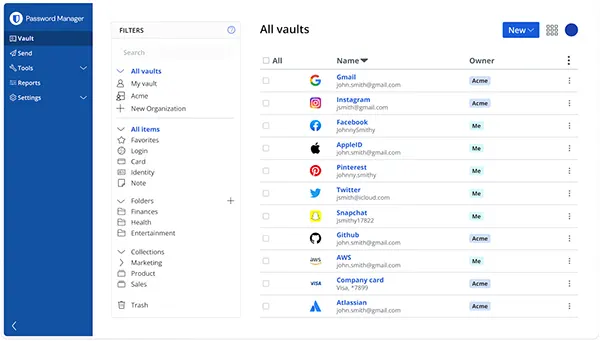
The mobile interface is intentionally minimalistic. Navigation focuses on quick access to saved credentials, secure notes, card information, and identity profiles. Users who switch from browser-based password storage systems usually adapt quickly because the structure remains logical and uncluttered.
Autofill performance improved significantly in recent versions of Android and iOS. In earlier years, password managers sometimes struggled with application compatibility, particularly in banking or corporate software. By 2026, Bitwarden Mobile works reliably with most mainstream browsers, social media applications, productivity tools, and financial apps, reducing friction during sign-in processes.
Offline access is another practical advantage. Even without internet connectivity, previously synchronised vault data remains accessible on the device. This becomes particularly useful while travelling, during network outages, or when accessing important accounts in areas with weak mobile coverage.
How Bitwarden Handles Privacy and Data Control
Privacy has become a major concern for mobile users, especially after growing awareness of tracking technologies and behavioural profiling. Bitwarden limits unnecessary data collection and does not monetise personal information through advertising systems. This approach appeals to users who prefer software focused on functionality rather than aggressive marketing ecosystems.
The application also supports self-hosting for advanced users and organisations. This means companies or technically experienced individuals can run their own Bitwarden servers instead of relying entirely on external infrastructure. Although most everyday users will never need this feature, its availability demonstrates flexibility that many competing password managers do not provide.
Bitwarden’s emergency access system is another notable feature. Users can designate trusted contacts who may request vault access under predefined conditions. In situations involving medical emergencies, loss of access, or family account management, this functionality can prevent important digital assets from becoming permanently inaccessible.
Advantages and Limitations of Bitwarden Mobile in 2026
One of Bitwarden Mobile’s biggest strengths remains affordability. Premium subscriptions cost noticeably less than many competing password managers while still including advanced options such as encrypted file attachments, integrated authenticator support, and additional two-factor authentication capabilities. For individuals who want practical security without premium pricing, this remains attractive.
The application also works consistently across different ecosystems. Users switching between Windows laptops, Android phones, iPads, and macOS systems can maintain synchronised credentials without compatibility issues. This flexibility matters because modern users rarely stay inside a single operating environment.
However, Bitwarden is not completely without limitations. Some users may find the interface less visually polished compared to heavily commercialised competitors. Others may require time to understand advanced security settings, especially when enabling additional authentication layers or configuring secure sharing between family members and teams.
Who Should Consider Using Bitwarden Mobile
Bitwarden Mobile is suitable for people who want stronger password protection without dealing with unnecessarily complicated software. Students, remote workers, freelancers, and regular smartphone users can all benefit from storing credentials securely instead of relying on notes applications, spreadsheets, or repeated passwords.
It is also a sensible option for users moving away from browser-only password storage. While browsers offer built-in credential saving, they usually provide fewer dedicated security controls and weaker account management tools. Bitwarden introduces centralised password management with additional monitoring and authentication features.
For businesses, Bitwarden Mobile offers team sharing capabilities, administrative controls, and secure credential distribution across devices. As remote work continues to remain common in 2026, companies increasingly require password management systems that work efficiently on mobile hardware rather than depending entirely on desktop environments.