Perplexity on Smartphones: Can It Replace Google and Notes in Daily Work?
Mobile applications based on AI have moved from experimental tools to everyday assistants. Perplexity is one of the most discussed examples in 2026, offering search, summarisation, and note-like functionality in a single interface. For users who rely on smartphones for work, the question is practical: can one application realistically replace both traditional search engines and note-taking tools? This article examines how Perplexity performs in real scenarios, where it works well, and where limitations still matter.
How Perplexity Works on a Smartphone in 2026
Perplexity combines conversational AI with web search, allowing users to ask questions and receive structured answers with cited sources. On smartphones, the interface is designed for quick queries, making it closer to a chat assistant than a conventional search engine. Instead of browsing multiple links, users get summarised responses with references that can be expanded if needed.
The application integrates real-time web access, which is a key distinction from older AI tools that relied on static datasets. This allows it to provide current information, including news, product comparisons, and technical explanations. For professionals who need up-to-date answers without opening multiple tabs, this significantly reduces friction in daily workflows.
Another important aspect is its ability to maintain context within conversations. Users can ask follow-up questions without repeating details, which is particularly useful on mobile devices where typing is less convenient. This conversational continuity creates a workflow that feels closer to interacting with an assistant rather than performing isolated searches.
Key Mobile Features That Affect Daily Use
Voice input has become one of the most practical features in Perplexity’s mobile version. Instead of typing, users can dictate queries, which speeds up information retrieval during multitasking situations such as commuting or meetings. The accuracy of speech recognition has improved noticeably compared to earlier AI tools.
The built-in source referencing system is another defining feature. Each response includes links to original materials, allowing users to verify information quickly. This is particularly relevant for work-related tasks where accuracy matters, such as research, marketing analysis, or technical troubleshooting.
Offline limitations still exist. While cached conversations can be accessed without an internet connection, real-time search capabilities depend entirely on connectivity. This means the application cannot fully replace traditional tools in environments with unstable networks.
Can Perplexity Replace Google for Everyday Tasks?
For many routine queries, Perplexity can effectively replace Google. Tasks such as quick fact-checking, summarising articles, or comparing products can be completed faster because the application removes the need to open multiple pages. This is especially noticeable on mobile devices where navigation between tabs is less efficient.
However, there are scenarios where traditional search engines remain more reliable. Complex queries that require browsing diverse viewpoints, niche forums, or highly specialised databases are still better handled through Google. Perplexity tends to prioritise summarised answers, which may omit less common but valuable perspectives.
Another limitation is transparency in ranking sources. While Perplexity provides references, it does not always offer the same level of control over search results as Google, where users can filter by date, region, or specific content types. For professional research, this level of control remains important.
Where Perplexity Outperforms Traditional Search
Speed is the most obvious advantage. Instead of scanning multiple pages, users receive a concise answer immediately. This is particularly useful for repetitive tasks such as checking definitions, understanding concepts, or summarising reports.
Contextual understanding also plays a significant role. Perplexity can interpret vague or incomplete questions and still provide relevant answers. This reduces the need for precise keyword formulation, which is often required in traditional search engines.
For content creators and analysts, the ability to generate structured responses saves time when drafting outlines or gathering initial information. While verification is still necessary, the initial research phase becomes noticeably faster.
Can Perplexity Replace Note-Taking Apps?
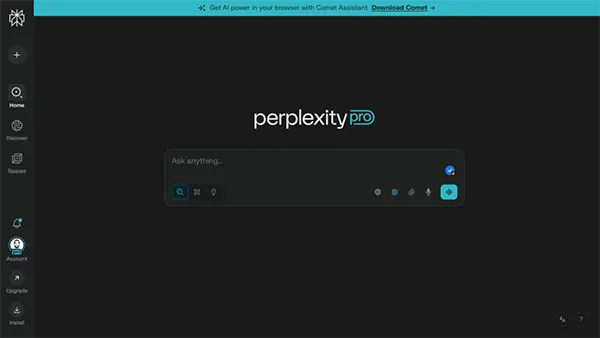
Perplexity includes features that resemble note-taking, such as saving conversations, organising threads, and revisiting previous queries. For simple use cases, this can replace traditional note apps, especially when notes are closely tied to research or ongoing tasks.
However, it is not a full replacement for dedicated note-taking tools. Applications like Notion or Evernote offer advanced organisation, tagging systems, offline editing, and collaboration features that Perplexity does not fully replicate. This makes it less suitable for managing large volumes of structured information.
Another consideration is formatting. While Perplexity allows users to copy and reuse generated content, it lacks advanced formatting options such as tables, embedded media, or complex layouts. For professionals who rely on structured documentation, this remains a limitation.
Best Use Cases for Replacing Notes with Perplexity
For quick idea capture, Perplexity works well as a hybrid between search and notes. Users can ask a question, refine the answer, and keep the conversation as a reference. This is particularly useful for brainstorming sessions or planning tasks.
It also performs well in research-heavy workflows. Instead of writing notes manually, users can rely on generated summaries and revisit them later. This reduces duplication of effort and keeps information linked to its original context.
For short-term tasks, such as meeting preparation or quick checklists, Perplexity can fully replace note-taking apps. However, for long-term knowledge management, dedicated tools still provide more control and reliability.