Hades Mobile (Netflix Edition) — How a Roguelike Actually Works on Touch Controls
Hades arriving on iOS through Netflix Games changed one key assumption many players had about action roguelikes: that they “need” a controller to feel right. This version isn’t a stripped-down spin-off — it’s the full game, delivered as a mobile release tied to an active Netflix subscription, with touch controls built specifically for glass screens. Supergiant Games also confirmed Bluetooth controller support, so you can switch between touch and a pad whenever you want.
What Exactly You’re Getting in the Netflix iOS Release (and What You’re Not)
Hades launched on iOS as a Netflix Games title on 19 March 2024. Access works the same way as other Netflix mobile games: you download Hades from the App Store, sign in with a Netflix account, and the game unlocks as part of that membership rather than as a separate paid purchase. In practice, it means the “price” is your ongoing subscription, not an upfront fee.
The important part is that this is presented as a complete port, not a compromised mobile edition. The core loop is intact: fast runs, permanent progression via the Mirror of Night, weapon aspects, Heat modifiers, and the same reactive storytelling that made the original so replayable. That completeness matters because roguelikes rely on repetition, and mobile players tend to notice immediately when systems have been simplified.
What you’re not getting (at least as of 2025) is an Android equivalent from Supergiant. Public coverage around launch stated there were no plans for an Android version, and the studio’s messaging has consistently framed the release as iOS-focused via Netflix Games. So if you’re on Android, the realistic option is still another supported device, not “waiting for the Play Store”.
Why Touch Controls Don’t Automatically Break Hades
Hades works on touch because the game’s combat rhythm is built around short, repeatable decisions rather than long, precise input chains. You dash, strike, cast, special, reposition — then repeat. That pattern can be mapped to touch controls more cleanly than something like a complex fighting game, because you’re rarely asked to do strict multi-button sequences under a single-frame timing window.
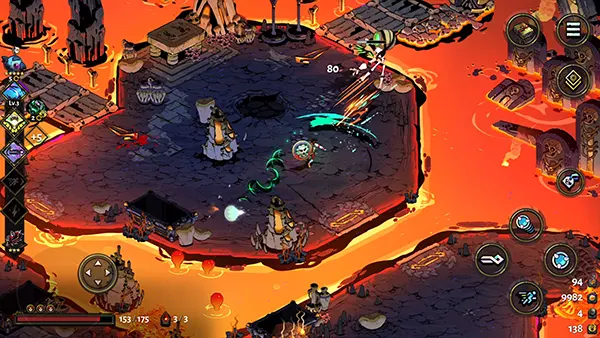
Supergiant didn’t just copy console buttons onto a phone screen. The iOS release includes all-new, highly customisable touch controls, meaning you can adjust layout and feel to match your hands and the device size you’re using. That matters more than it sounds: a layout that feels fine on a Pro Max can be uncomfortable on a smaller iPhone, and customisation prevents the game from feeling like it was designed for one exact screen.
There’s also a very practical point: touch controls reduce friction for casual sessions. If you have ten minutes, you can launch a run instantly without grabbing hardware. That convenience fits the roguelike structure perfectly, because Hades is designed around “one more run” behaviour — mobile simply makes that loop easier to indulge.
How the Mobile Touch Layout Feels During Real Runs
The first thing you notice is that movement becomes a different skill. On a controller, movement is a smooth analogue decision; on touch, it’s closer to controlled sliding on a virtual stick. Hades is forgiving here because the dash is your main reposition tool, and dashing is a discrete action. Once you mentally treat movement as “dash-led positioning” rather than “perfect footwork”, the touch scheme makes more sense.
Attacking and casting are where a touch layout can either shine or fall apart. The good news is that most of Zagreus’ basic actions are single taps. The tricky part is combining them while also dodging in the direction you intend, because your thumbs are doing more work than on a controller. Many early impressions describe the port as smooth, but also note that touch can feel awkward until you settle on a layout and sensitivity that suits your grip.
If you want the best “mobile feel”, the game rewards you for picking builds that minimise precision stress. Boons and weapon choices that create wide hitboxes, lingering damage, or auto-targeting effects can make touch play feel surprisingly natural. In contrast, setups that rely on micro-adjusted positioning or tight aim windows can be more fatiguing on a phone screen.
Practical Settings That Make Touch Play Better (Not Just “Different”)
Start with HUD and button positioning. Even small shifts can reduce accidental taps and stop your thumbs blocking enemy tells. Treat it like adjusting a chair: you don’t notice a good setup, but you absolutely notice a bad one after three chambers in Asphodel. Since the touch controls are adjustable, it makes sense to use that flexibility rather than forcing yourself to adapt to a default layout.
Next, set expectations about session length. Hades can encourage long play sessions because runs blend together, but phone ergonomics don’t always cooperate. Shorter sessions are often more enjoyable on touch: you stay sharp, your hands stay relaxed, and your decisions remain clean. For longer sessions, an iPad or a controller tends to feel better simply because of hand spacing and reduced thumb strain.
Finally, consider when a controller is worth it. The iOS version supports Bluetooth controllers, and that option can turn Hades Mobile into a genuinely comfortable “portable console” experience. A pad makes weapon styles like the bow or rail feel more consistent, and it reduces the mental load of balancing movement and attacks on the same thumbs.
Performance, Battery, and the “Is This Actually a Good Mobile Port?” Question
Performance is one of the strongest parts of the iOS Netflix edition. Early hands-on impressions consistently describe it as running very smoothly, with the same fast feedback that defines the original. That responsiveness is essential because Hades isn’t turn-based or slow-paced — if the input feels delayed, the whole combat loop collapses.
That said, mobile performance isn’t only about frame rate. It’s also about heat, battery drain, and whether your device stays comfortable to hold. Hades is visually busy and constantly animating effects, which can be demanding during extended sessions. In real use, the experience tends to be best when you play in shorter bursts, keep brightness reasonable, and avoid heavy background activity.
There’s also a lifestyle consideration: because the game is tied to Netflix Games, it fits naturally for people who already maintain a subscription. If you don’t, the value calculation changes. You’re not paying for one game — you’re paying for access. For some players, that’s fine; for others, it’s a deal-breaker compared with buying Hades once on another system.
The Real Answer: Which Players Will Enjoy Hades Most on Touch?
If you like the idea of “one run on the train” or “one run before bed”, touch controls can feel surprisingly good once customised. Hades is structured for repeatability, the chambers are compact, and the game constantly rewards small progress — all of which matches mobile play habits. The Netflix iOS version is also a clean way to experience the full narrative if you never committed to the game on PC or console.
If you’re already a high-Heat player who values precision above all else, you may still prefer a controller — and that’s not a failure of the port. It’s just that top-end play pushes inputs harder, and touch has physical limits. The positive point is that iOS players aren’t locked into touch: you can treat touch as your casual mode and a pad as your “serious runs” setup.
Overall, the mobile Netflix edition succeeds because it respects what Hades is: a fast, readable combat loop wrapped in a roguelike structure that expects repetition. Touch controls don’t replace the controller experience, but they don’t sabotage it either — and that’s the real win. It’s a proper version of a modern classic, adapted thoughtfully for the way people actually play on phones in 2025.
Hades arriving on iOS through Netflix Games changed one key assumption many players had about action roguelikes: that they “need” a controller to feel right. This version isn’t a stripped-down spin-off — it’s the full game, delivered as a mobile release tied to an active Netflix subscription, with touch controls built specifically for glass screens. Supergiant Games also confirmed Bluetooth controller support, so you can switch between touch and a pad whenever you want.
What Exactly You’re Getting in the Netflix iOS Release (and What You’re Not)
Hades launched on iOS as a Netflix Games title on 19 March 2024. Access works the same way as other Netflix mobile games: you download Hades from the App Store, sign in with a Netflix account, and the game unlocks as part of that membership rather than as a separate paid purchase. In practice, it means the “price” is your ongoing subscription, not an upfront fee.
The important part is that this is presented as a complete port, not a compromised mobile edition. The core loop is intact: fast runs, permanent progression via the Mirror of Night, weapon aspects, Heat modifiers, and the same reactive storytelling that made the original so replayable. That completeness matters because roguelikes rely on repetition, and mobile players tend to notice immediately when systems have been simplified.
What you’re not getting (at least as of 2025) is an Android equivalent from Supergiant. Public coverage around launch stated there were no plans for an Android version, and the studio’s messaging has consistently framed the release as iOS-focused via Netflix Games. So if you’re on Android, the realistic option is still another supported device, not “waiting for the Play Store”.
Why Touch Controls Don’t Automatically Break Hades
Hades works on touch because the game’s combat rhythm is built around short, repeatable decisions rather than long, precise input chains. You dash, strike, cast, special, reposition — then repeat. That pattern can be mapped to touch controls more cleanly than something like a complex fighting game, because you’re rarely asked to do strict multi-button sequences under a single-frame timing window.
Supergiant didn’t just copy console buttons onto a phone screen. The iOS release includes all-new, highly customisable touch controls, meaning you can adjust layout and feel to match your hands and the device size you’re using. That matters more than it sounds: a layout that feels fine on a Pro Max can be uncomfortable on a smaller iPhone, and customisation prevents the game from feeling like it was designed for one exact screen.
There’s also a very practical point: touch controls reduce friction for casual sessions. If you have ten minutes, you can launch a run instantly without grabbing hardware. That convenience fits the roguelike structure perfectly, because Hades is designed around “one more run” behaviour — mobile simply makes that loop easier to indulge.
How the Mobile Touch Layout Feels During Real Runs
The first thing you notice is that movement becomes a different skill. On a controller, movement is a smooth analogue decision; on touch, it’s closer to controlled sliding on a virtual stick. Hades is forgiving here because the dash is your main reposition tool, and dashing is a discrete action. Once you mentally treat movement as “dash-led positioning” rather than “perfect footwork”, the touch scheme makes more sense.
Attacking and casting are where a touch layout can either shine or fall apart. The good news is that most of Zagreus’ basic actions are single taps. The tricky part is combining them while also dodging in the direction you intend, because your thumbs are doing more work than on a controller. Many early impressions describe the port as smooth, but also note that touch can feel awkward until you settle on a layout and sensitivity that suits your grip.
If you want the best “mobile feel”, the game rewards you for picking builds that minimise precision stress. Boons and weapon choices that create wide hitboxes, lingering damage, or auto-targeting effects can make touch play feel surprisingly natural. In contrast, setups that rely on micro-adjusted positioning or tight aim windows can be more fatiguing on a phone screen.
Practical Settings That Make Touch Play Better (Not Just “Different”)
Start with HUD and button positioning. Even small shifts can reduce accidental taps and stop your thumbs blocking enemy tells. Treat it like adjusting a chair: you don’t notice a good setup, but you absolutely notice a bad one after three chambers in Asphodel. Since the touch controls are adjustable, it makes sense to use that flexibility rather than forcing yourself to adapt to a default layout.
Next, set expectations about session length. Hades can encourage long play sessions because runs blend together, but phone ergonomics don’t always cooperate. Shorter sessions are often more enjoyable on touch: you stay sharp, your hands stay relaxed, and your decisions remain clean. For longer sessions, an iPad or a controller tends to feel better simply because of hand spacing and reduced thumb strain.
Finally, consider when a controller is worth it. The iOS version supports Bluetooth controllers, and that option can turn Hades Mobile into a genuinely comfortable “portable console” experience. A pad makes weapon styles like the bow or rail feel more consistent, and it reduces the mental load of balancing movement and attacks on the same thumbs.
Performance, Battery, and the “Is This Actually a Good Mobile Port?” Question
Performance is one of the strongest parts of the iOS Netflix edition. Early hands-on impressions consistently describe it as running very smoothly, with the same fast feedback that defines the original. That responsiveness is essential because Hades isn’t turn-based or slow-paced — if the input feels delayed, the whole combat loop collapses.
That said, mobile performance isn’t only about frame rate. It’s also about heat, battery drain, and whether your device stays comfortable to hold. Hades is visually busy and constantly animating effects, which can be demanding during extended sessions. In real use, the experience tends to be best when you play in shorter bursts, keep brightness reasonable, and avoid heavy background activity.
There’s also a lifestyle consideration: because the game is tied to Netflix Games, it fits naturally for people who already maintain a subscription. If you don’t, the value calculation changes. You’re not paying for one game — you’re paying for access. For some players, that’s fine; for others, it’s a deal-breaker compared with buying Hades once on another system.
The Real Answer: Which Players Will Enjoy Hades Most on Touch?
If you like the idea of “one run on the train” or “one run before bed”, touch controls can feel surprisingly good once customised. Hades is structured for repeatability, the chambers are compact, and the game constantly rewards small progress — all of which matches mobile play habits. The Netflix iOS version is also a clean way to experience the full narrative if you never committed to the game on PC or console.
If you’re already a high-Heat player who values precision above all else, you may still prefer a controller — and that’s not a failure of the port. It’s just that top-end play pushes inputs harder, and touch has physical limits. The positive point is that iOS players aren’t locked into touch: you can treat touch as your casual mode and a pad as your “serious runs” setup.
Overall, the mobile Netflix edition succeeds because it respects what Hades is: a fast, readable combat loop wrapped in a roguelike structure that expects repetition. Touch controls don’t replace the controller experience, but they don’t sabotage it either — and that’s the real win. It’s a proper version of a modern classic, adapted thoughtfully for the way people actually play on phones in 2025.